22/tcp open ssh_visual80/tcp open web_shell443/tcp open privacy_tls404/tcp closed tracking
4 sectors scanned // 0 threats
NEURAL LINK OVERLOADBUFFER_SPIKE // 0xFF77A9
DISPLAY SIGNAL LOST[ ESC / TAP ]
⚠ SYSTEM PANIC ⚠QUANETRA_FAILSAFE_PROTOCOL // SYSTEM HALTED[ ESC / TAP ]
NORMAL~/quanetra/frameshelfutf-8en
[ ROUTE://SYNC ]
jakub@quanetra:~/projects$ open frameshelf.app
Native macOS app
Your videos. Now better understood.
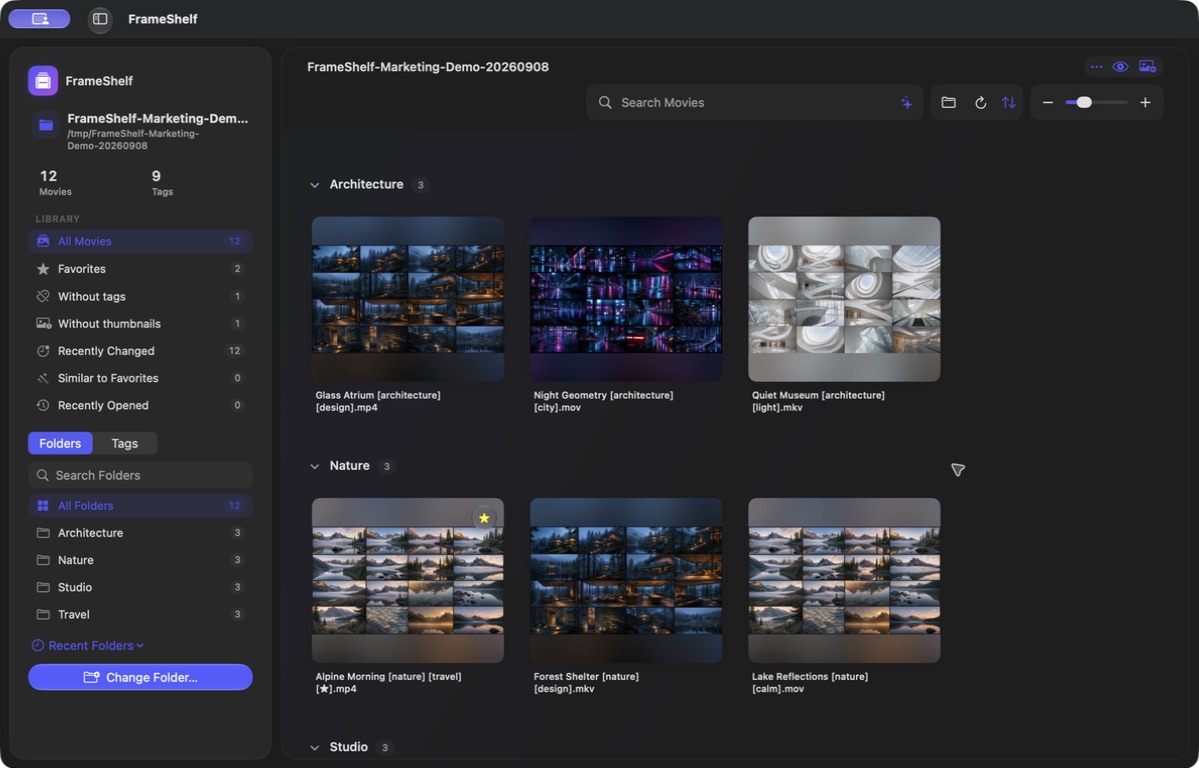
FrameShelf turns a selected folder and its subfolders into a fast visual library. Ask about footage, find similar movies, and organize filenames without importing files or sending them to the cloud.
Colorful text illustration showing a video contact sheet in FrameShelf.
scan --library
[00]----[01]----[02]----[03]----[04]----[00]----[01]----[02]----[03]----[04]----[00]----[01]----[02]----[03]----[04]----[00]----[01]----[02]----[03]----[04]----+-------+.......+-------+.......+-------++-------+.......+-------+.......+-------++-------+.......+-------+.......+-------++-------+.......+-------+.......+-------+{ scan }-->{ sort }-->{ tag }-->{ find }{ scan }-->{ sort }-->{ tag }-->{ find }{ scan }-->{ sort }-->{ tag }-->{ find }{ scan }-->{ sort }-->{ tag }-->{ find }
[ FEATURES://INDEX ]items = 6;
// features
From a folder to an intelligent library.
+--[01]--+
A folder becomes a library
Choose a folder on your Mac, an external drive, or an available network volume. FrameShelf scans its subfolders and groups videos by their real location.
+--[02]--+
Ask your library
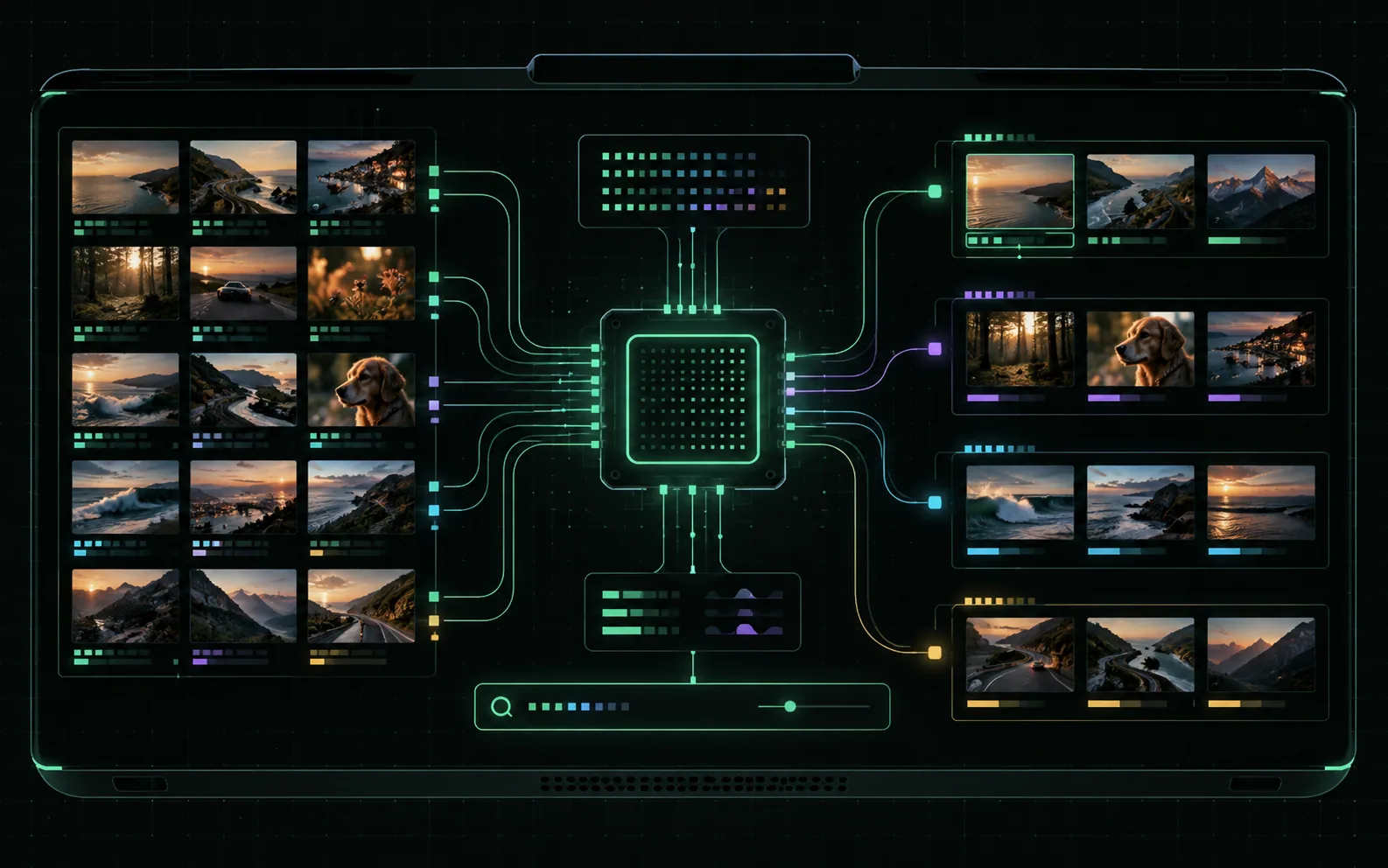
Type a question in everyday language. On a compatible Mac, Apple Intelligence answers questions about the collection and prepares filters for you to review before applying.
+--[03]--+
Better frames with Vision
FrameShelf creates 4×4 contact sheets and, on macOS 15 or later, local Vision analysis chooses a clearer frame from each section of the movie.
+--[04]--+
Similar footage and duplicates
Compare contact sheets to find visually similar movies, likely duplicates, and footage that resembles the movies you marked as favorites.
+--[05]--+
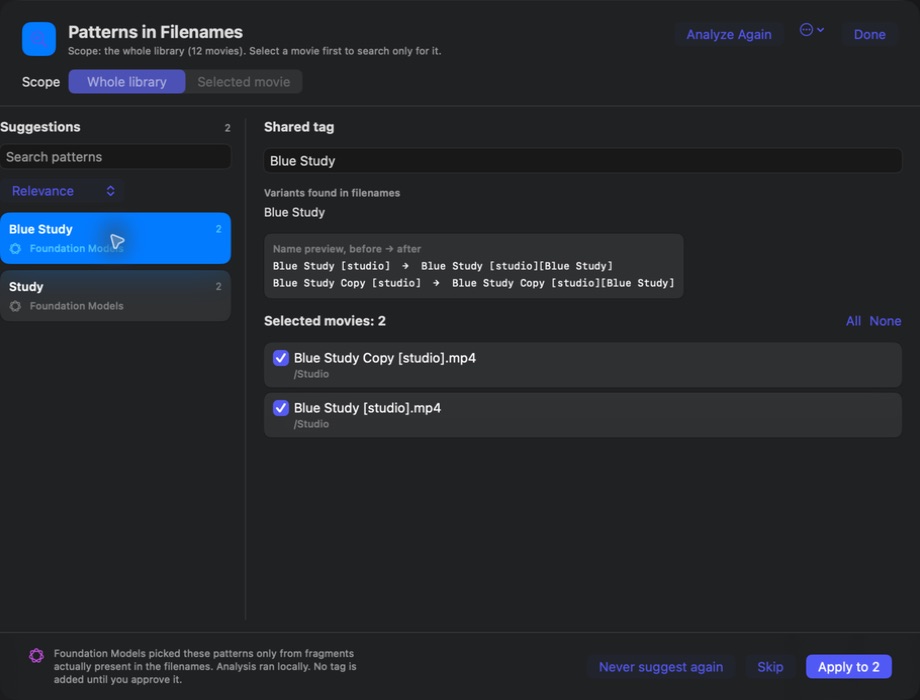
Tag and filename suggestions
Vision suggests tags, Translation renders them in the interface language, and Apple Intelligence can refine them, detect filename patterns, and suggest a clearer filename.
+--[06]--+
Library Health
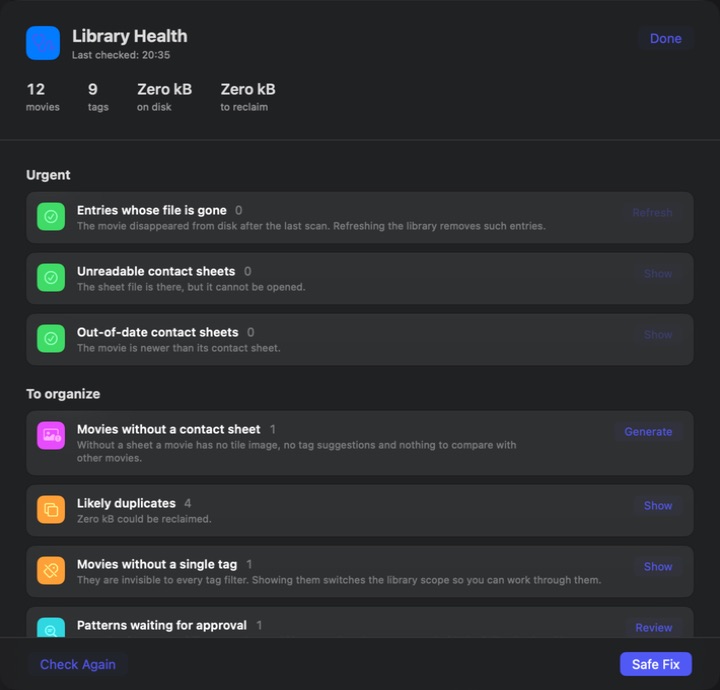
The audit shows missing or stale contact sheets, untagged movies, duplicates, ghost entries, and safe actions that can repair the library.
REC_2026_08_24.mov+--[ footage ]--+00:18:42
// for_creators
Hours of footage. Seconds to the right shot.
Shooting trips, events, YouTube videos, or documenting your own projects? FrameShelf builds a sheet from 16 movie sections and, on macOS 15+, Vision locally selects the clearest frame from each section while keeping the movie chronology intact.
Image analysis, translation, and supported Apple Intelligence features run on-device. FrameShelf can answer a question or prepare suggestions and filters, but you always decide what gets applied.
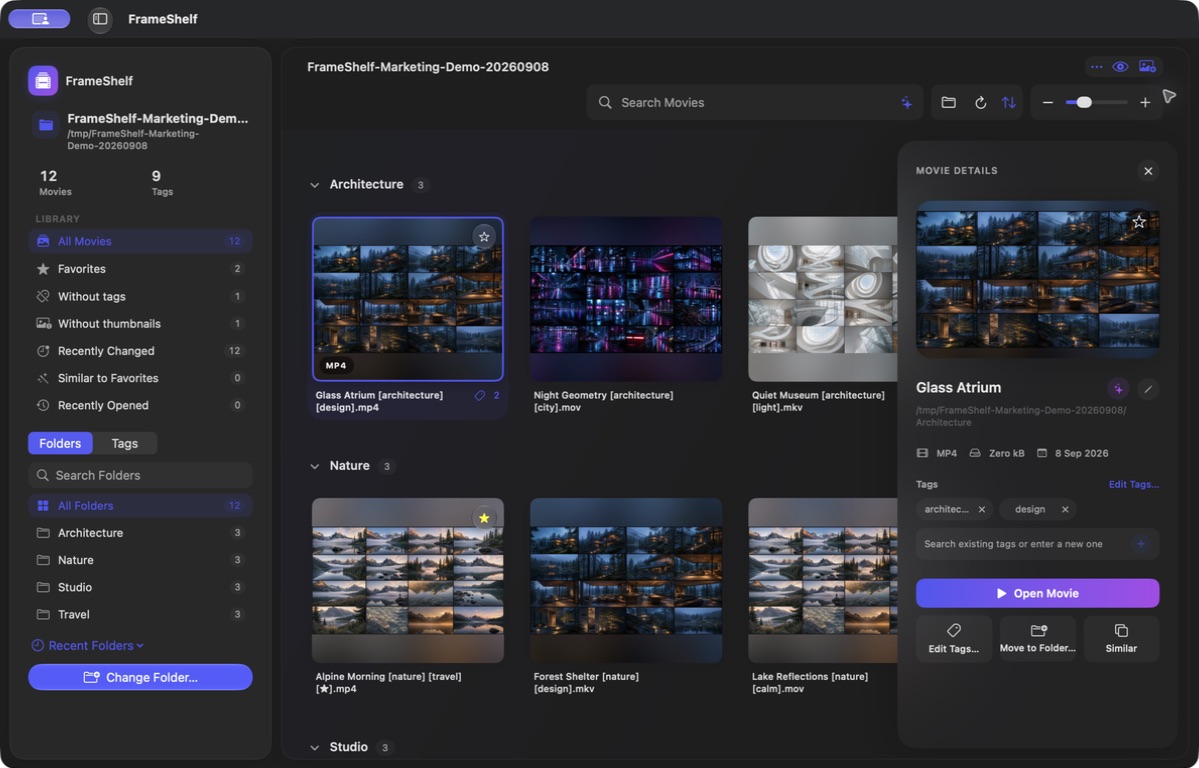
The large preview and inspector show the contact sheet, filename, location, and tags. Open the movie, move it to another folder, edit its tags, or find similar footage directly.
✓ preview, inspector, and complete keyboard navigation
✓ move a movie together with its related contact sheets
✓ scopes, filters, and sorting without importing source files
+--[ preview://selected ]--+
REC_0042.MOVFRAME_LOCKED00:18:42
// inspect_then_apply
Review first. Then act with intent.
FrameShelf shows analysis results and proposed operations before it makes a change. Suggestions never modify files automatically.
01LIBRARY_HEALTHLOCAL
An audit without guesswork
Library Health gathers missing and stale sheets, duplicate candidates, and safe repairs in one place.
02FILENAME_PATTERNSREVIEW
Patterns you approve yourself
Apple Intelligence finds recurring people, studios, series, or places in filenames. An approved pattern and its spelling variants return for new movies—even later without Apple Intelligence.
+--[ MORE ]--+And that is only part of what it can do.
// from_the_guide
Small features. A meaningful difference.
+--[01]--+
Answers are counted, not guessed
When you ask for a count or a list, the assistant uses the app’s local tools. It reads facts from the open library and can only prepare filters for you to approve.
+--[02]--+
Three safe filename suggestions
Apple Intelligence separates the meaningful title from technical parameters and identifiers. Pick one of three complete names while the extension, tags, and [★] remain intact.
+--[03]--+
Favorites travel with the movie
The [★] marker lives in the filename, just like tags. It survives backups, moving the library to another drive, and switching computers.
+--[04]--+
A view shaped for the task
Recently Changed collects new and renamed movies from the last 14 days. Tile scale, collapsible folders, and intelligent cropping adapt the grid to the work at hand.
// privacy
Your library stays with you.
$ frameshelf --privacy-check
✓ videos imported into the app 0
✓ videos or analysis uploaded to cloud 0
✓ accounts / analytics / ads 0
✓ access outside selected folders 0
status: files stay in place
privacy = local;
>>>>>>> BUILD >>>>>>> TEST >>>>>>> SIGN >>>>>>> SHIP >>>>>>> BUILD >>>>>>> TEST >>>>>>> SIGN >>>>>>> SHIP >>>>>>> BUILD >>>>>>> TEST >>>>>>> SIGN >>>>>>> SHIP >>>>>>> BUILD >>>>>>> TEST >>>>>>> SIGN >>>>>>> SHIP [OK]--------[OK]--------[OK]--------[READY]-----[OK]--------[OK]--------[OK]--------[READY]-----[OK]--------[OK]--------[OK]--------[READY]-----[OK]--------[OK]--------[OK]--------[READY]-----return 0;....checksum:pass....mode:native....return 0;....checksum:pass....mode:native....return 0;....checksum:pass....mode:native....return 0;....checksum:pass....mode:native....